Internal Reference:
8022
Data loggers nearing the end of their calibration period can be swapped at any time with the AssetTag for a calibrated logger, effortlessly, without paperwork, without reconfiguration and without any interruption to your measurement history.
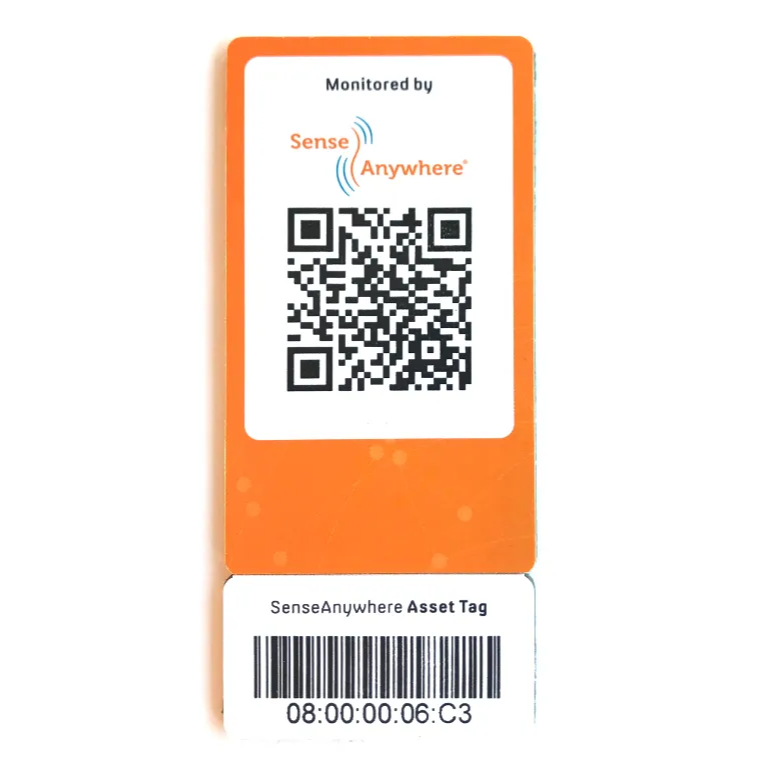
What is an AssetTag?
An AssetTag is a card with a barcode for the logger holder and a QR code for the outside of the asset (for example a refrigerator or a shelving location). The AssetTag represents the monitored object in SAClient, independent of whichever physical logger happens to be linked to it at that moment.
How does it work?
- The card can be split into two parts
- Stick the bottom part onto the logger holder
- Attach the top part to the outside of the asset (for example the cooling unit or the shelving location)
- Scan the QR code to instantly see the status of the asset: which device (serial number) is currently linked to it, and the latest temperature reading
- To link, unlink or swap data loggers, go to SAClient
Because the asset itself is linked to the AssetTag, rather than directly to one physical logger, you can freely swap loggers without losing the asset’s history or settings.
Benefits
- Swap data loggers nearing the end of their calibration period at any time for a calibrated logger, without modifying the asset itself
- No unnecessary paperwork or administration when swapping a logger
- No reconfiguration needed: alarms, reports and settings remain intact on the asset
- Complete, uninterrupted temperature/RH history of the asset, even across a logger swap
- All changes are automatically recorded in the audit trail
In practice
Especially handy for hard-to-reach locations, such as high shelving: simply scan the QR code with your smartphone to instantly see the latest temperature reading, without having to reach or read out the logger itself.
This application is extremely user-friendly. More information on the asset-tagging principle can be found in the SAClient help section.